UTM Builder - Free Google URL Builder to Generate UTM Codes
Pick a builder below, fill in your campaign information, and a final URL with UTM codes is created automatically. Copy it and use it in your campaigns.
The basic builder takes the required fields Website URL, UTM Source, UTM Medium, UTM Campaign and the optional fields UTM Content and UTM Term.
The URL builder generates your UTM URL as you type. Copy the generated URL and use it in your campaigns. The other tabs build links against governed templates, where the fields and allowed values come from a shared naming convention.
Free guide · A short video for every chapter · No signup
The Marketing Taxonomy Guide
Building one UTM link is easy. Keeping every link your team builds consistent, so your reports actually add up, is the hard part. Here’s what you’ll learn:
- Decide what your links must record, starting from the reports you need
- Stop one campaign splitting into five rows over case, dates and separators
- Pick a naming structure that fits your team: flat, structured, key-value or ID
- Join ad spend to CRM revenue, with the campaign name as the key
- Catch mistakes before they reach reports, and audit what slips through
- Change your taxonomy without breaking last year’s numbers
Frequently asked questions
What is a UTM code?
A UTM code is a set of parameters added to the end of a URL so analytics tools can tell where a visit came from. The five parameters are utm_source, utm_medium, utm_campaign, utm_content and utm_term.
Which UTM parameters are required?
utm_source, utm_medium and utm_campaign are required for a campaign to report correctly. utm_content and utm_term are optional and are normally used for testing creative and for paid search keywords.
Is this UTM builder free?
Yes. The basic builder on this page is free and needs no signup. Nothing you type into it is saved.
How do I stop my team from naming campaigns inconsistently?
Agree the naming rules once and enforce them at the point the link is built, rather than correcting names afterwards in a spreadsheet. The template tabs above show builders with those rules already applied.
If you need to take your UTM strategy to the next level, read on.
UTM Builder: What is it and why you need it?
Even though adding UTM parameters to a URL looks simple, the process can be highly error prone when you consider wide variety of URLs as well as doing the same step many times for a lot of URLs. It's best to use a campaign URL builder that generates these URLs for you.
In the following sections, we'll dive into various parts of a URL and how UTM parameters fit into them.
How does a UTM link look like?
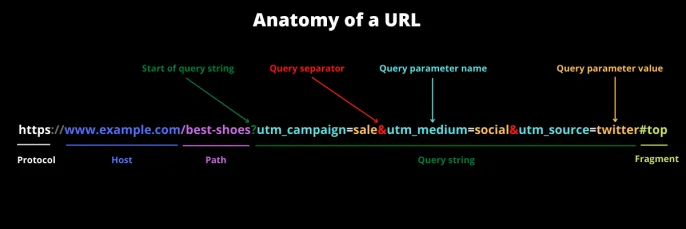
A URL has many parts and each of them needs to be put together correctly to build the final URL that works.
-
Protocol or scheme:
This defines how the connection to the website should be made. The most common forms arehttpandhttps, but others likeftp,sftp,mailto, etc. can also be used. The separator://could be different depending on the protocol. -
Host:
This is the host of the website. Often it includes the domain and subdomain. For example,www.example.com -
Path:
This is the location or page of the website that you visit. For example/best-shoes -
Query string:
The part after the?but before#is the query string. It's an optional value that you pass to the website. For example,utm_campaign=sale&utm_medium=social&utm_source=twitter -
Fragment:
The part after and including#is the fragment. This should always be at the end of the URL. This part is meant to be handled by the browser once the webpage loads. -
Query parameters:
Query string can consist of one or more query parameters. Each of these query parameters has a name and a value. Different query parameters are separated by&if there are multiple parameters.
What are UTM parameters / UTM tags / UTM codes?
Some call them UTM parameters, some UTM codes, while others prefer UTM tags. But they all mean the same. We'll stick to UTM parameters since Google does as well.
UTM parameters are a set of five parameters: utm_campaign, utm_medium, utm_source, utm_content, and utm_term.
Let's go through each of them in brief.
| UTM Parameter | Description |
|---|---|
| UTM Source utm_source | You can use this to identify the website, app, or any other source like newsletter, etc. |
| UTM Medium utm_medium | It specifies the name of the marketing medium, e.g. social, cpc, email, etc. |
| UTM Campaign utm_campaign | This is the name of your marketing effort. In short, the name of your campaign, e.g. promo, sale, etc. |
| UTM Content utm_content | This is used to identify the context in the which the link was clicked. It could be the name of your CTA (Call to Action) or the headline of an ad. e.g. buy-now, etc |
| UTM Term utm_term | This is used to identify the keyword in paid search ads. It's better to not use it for anything else. e.g. shoes, etc. |
These parameters can be added to any URL. Let's say you have a URL
https://www.example.com
After adding UTM parameters to this URL, it will look something like this.
https://www.example.com/?utm_source=google&utm_medium=cpc&utm_campaign=sale&utm_content=signup
You can then share these UTM tracked (tagged) URLs on various channels. These channels can include:
- Social networks like Facebook, Twitter, LinkedIn
- Email campaigns like newsletter, drip, purchases, cold email, etc.
- Ad campaigns including search, display, retargeting
- Print media like flyers, billboards, visiting cards, promotional material, etc.
Why do we need these UTM parameters anyway?
Let me ask you a question? How do you think Google Analytics knows where your visitors are coming from?
If you guessed browser Referrer, you'd be right.
But the Referrer is not always set due to many reasons, including:
- Bookmarked URL
- Direct typing the URL in the browser
- Mobile apps
- Email clients
- Going from HTTPS to HTTP website
- and many other reasons
So if you cannot rely on the Referrer, you need to take matters in your own hands. That's when you add UTM parameters to the URL. They help you minimize your Direct visits.
For the full picture of how a visit gets its source and medium, read How Analytics Reads a Visit in the Marketing Taxonomy Guide.
Who detects these UTM parameters?
Many analytics tools besides Google Analytics automatically detect UTM parameters in the URLs. This includes Mixpanel and Kissmetrics, the two popular funnel-based analytics systems.
What should you consider when building UTM codes?
- Never add UTM tags to internal links
- Try to add UTM tags to all your campaigns in a consistent manner
- Be consistent with the case. It's best to use lowercase to avoid any confusion.
- Use a Campaign URL builder to make sure that your URLs are built correctly
-
Use the same values everytime. For example, if you use
twitter, then don't usetworTwitteror other variations. A UTM generator tool can help you keep track of this. - Don't use spaces. Use dashes or underscores based on complexity and your own specific analytics needs. It's not that simple!
- Clearly define your UTM strategy and follow UTM parameters best practices. The Marketing Taxonomy Guide walks through it end to end.
-
When you have multiple data points in a single UTM, use dashes to separate them. For example,
weekly-2022_12_31uses a dash to separateweeklyand2022_12_31. If you need to capture lot of data points in UTMs, consider using UTM Conventions
How can I add UTM codes to a form submission?
UTM codes can also greatly enrich your lead generation efforts. Won't it be great if you could find out exactly where each of your lead came from? All you need to do is capture the UTM codes and referrer whenever someone submits your lead/contact forms. This will save UTM information along with the lead and you'll know which of your campaigns are working.
Different UTM Builder Options
When you create a many UTM links, it's good to keep track of them. You should also have a way to organize your UTM parameters so that you know which of them are used with which of your campaigns. You have a few options:
1. Basic URL builder
These are the simplest and most common types of URL builders you'll find. For example, the UTM builder above or the Google URL builder can build your UTM links quickly.
Pros:
- Easy to use
- Free
Cons:
- Error prone
- Not always easy to remember what to use
- Difficult to enforce consistency across teams
- Does not shorten URLs automatically for social and other such campaigns
- Cannot handle bulk building
2. UTM spreadsheets
When you need to save your past UTM links and refer them in the future, you can use a UTM spreadsheet. You can use either Google Sheets or Microsoft Excel to build your spreadsheet. You can even compare among the many free UTM spreadsheet templates and pick the one that works best for you.
Pros:
- Can save your past URLs and have a central location to refer to for your team
- You can use the same spreadsheet for multiple campaigns
- Fairly easy to use, but not as easy as the basic URL builder
- Free
Cons:
- Highly error prone and fragile
- Easy to break and overwrite formulas
- Cannot handle URL encoding well
- Does not shorten URLs automatically for social and other such campaigns
- Cannot shorten URLs automatically
- Highly dependent on one or two people who know how to configure the spreadsheet
- Difficult to manage as they grow larger and your requirements complex.
3. UTM Tag Management Software
A better way to organize UTM links is to use a UTM builder and management tool which can greatly simplify your UTM management even for large teams and complext UTM strategy. These can handle highly complex requirements than the basic URL builder or the UTM spreadsheet.
Pros:
- Centralized location to manage all URLs and UTMs
- Enforce complex UTM taxonomy requirements
- Have consistent UTM parameters across your company
- Auto-shortening of all URLs
- Tag URLs in bulk
- Fine-grained user permissions depending on the role
- Many more features like QR codes, vanity URLs, click reports and more.
Cons:
- Not free
- Requires initial one-time setup
How do I create UTM URLs in bulk?
It's possible to use spreadsheets to create UTM links in bulk. But it generally involves a lot of manual work. You need to copy all the data that is identical and change the columns that are not. Since most of the time there are only a few columns that change, you can use a UTM builder that will automatically create the UTM links for you in bulk. Here's how it works:
What is a UTM governance model?
A naming convention that lives in the builder instead of in a document. Rather than writing down that the source should be lowercase and the campaign should carry a date, you define the fields once: which are required, which are dropdowns, what values those dropdowns allow, and which values depend on what has already been answered.
Everyone building a link works from that definition, so the convention is applied rather than remembered. That is the whole difference. A document describes what people ought to type. A governance model decides what they are able to type.
To choose a structure for your own convention, see Taxonomy Types, and for who owns the rules as they change, see Ownership and Change.
Some more UTM resources
- The Marketing Taxonomy Guide: the open book on UTM strategy and taxonomy governance
- UTM parameters best practices
- How to use UTM parameters for Social Media
- FAQ about UTM parameters
- UTM Naming Conventions: Define and Enforce your UTM strategy
- Guide to Using UTM parameters
- Dash (Hyphen) or Underscore in URLs?